How to Add, Change & Update Your Email Signature in Outlook
Whether you need to add a new signature, edit existing contact details, or fix distorted logos in Classic Outlook, follow this all-in-one guide tested across New Outlook, Classic Desktop, Web, Mac, and Mobile.
Choose Your Outlook Version
Microsoft Outlook Rendering Engine Matrix & Benchmark
Why does a signature render flawlessly in webmail but break when sent to corporate Outlook users? Microsoft Outlook is not a single software program—it spans 5 completely different rendering engines with fundamentally incompatible layout models.
| Outlook Client Edition | Underlying Engine | CSS Grid / Flexbox | Windows DPI Scaling (125%/150%) | 10px Paragraph Gap Bug | Dark Mode Mechanism | Compiler Output Status |
|---|---|---|---|---|---|---|
| Classic Outlook (2016-2024 / M365) | Microsoft Word 16.0 (MSO) | 0% (Ignored) | Extreme Stretches | Frequent 10px Gap | Bimodal Inversion | Held in place |
| New Outlook for Windows (Fluent) | Edge WebView2 (Chromium) | Full Support | Crisp Scaling | Zero Gaps | CSS Media Theme | Native Verified |
| Outlook on the Web (OWA) | Browser Native (Blink/Gecko) | Full Support | Crisp Scaling | Zero Gaps | Portal Theme Override | Native Verified |
| Outlook for Mac (Tahoe / Sonoma) | Apple WebKit | Full Support | Retina Crisp | Zero Gaps | macOS Dark Scheme | Fallback Guarded |
| Outlook Mobile (iOS & Android) | Native Hybrid WebView | Full Support | Mobile DPI | Zero Gaps | Auto High-Contrast | Color Protected |
The Root Cause: Microsoft Word as an HTML Renderer
Classic Desktop Outlook (used by over 60% of corporate enterprise employees) does not use a browser engine. It executes HTML inside Microsoft Word 16.0. Word has no concept of modern CSS box models, ignores flex/grid, and treats table cells as Word paragraphs with default line heights and margins.
The Dual-Track Compiler Solution
EmailSignatureKit compiles every signature with conditional Word directives (<!--[if mso]>). When viewed in Classic Outlook, strict nested table constraints dictate exact pixel geometry; when opened in New Outlook, Web, or Mobile, clean inline CSS ensures responsive high-DPI rendering.
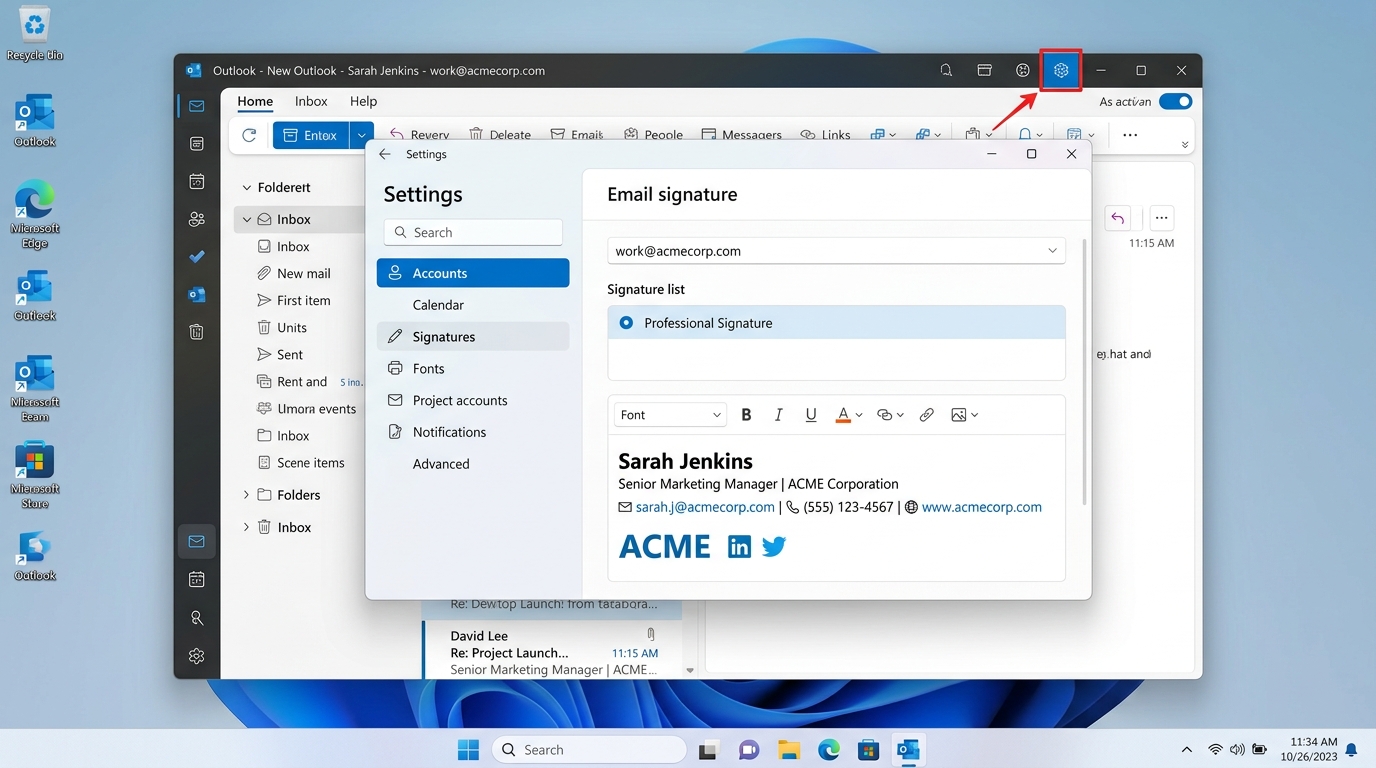
New Outlook for Windows (Windows 11 & 10)
Path: Settings (Gear Icon) > Accounts > Signatures
How to Add, Edit, or Update Your Signature:
- Copy your signature: Design your signature in the studio below and click One-Click Copy.
- Open Settings: Launch New Outlook on Windows and click the Gear icon (Settings) in the top-right title bar.
- Navigate to Signatures: In the left-hand navigation pane, select Accounts, then click Signatures.
- Add or Edit: Click + New signature to create one, or select your existing signature name to update contact details.
- Paste and Save: Paste (
Ctrl + V) into the rich text editor area. Assign it to New messages (and optionally to Replies/forwards, or leave as none to prevent thread clutter), then click Save.
New Outlook runs Chromium web views rather than Microsoft Word. It supports modern CSS rounding and transparent PNG logos without MSO rendering artifacts.
Classic Outlook Desktop (365, 2021, 2019, 2016)
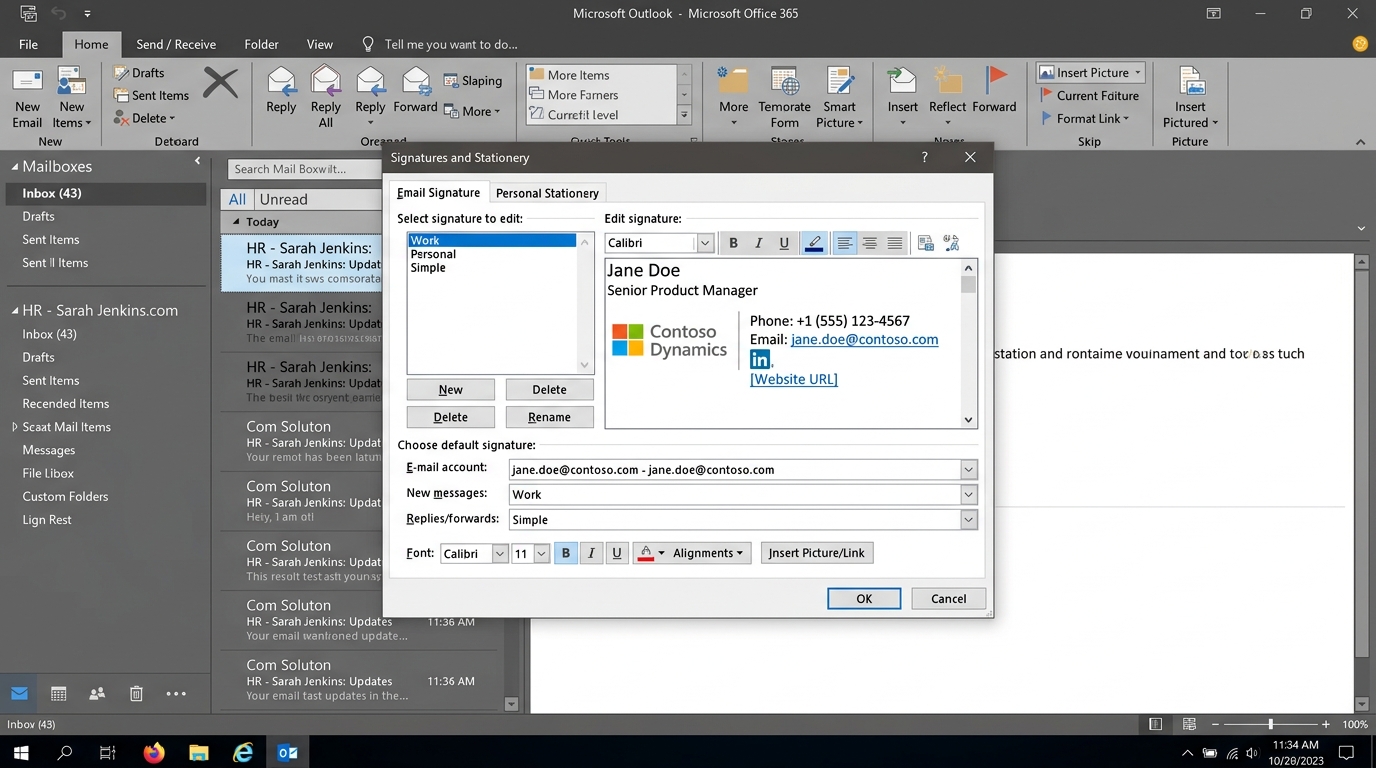
Path: File > Options > Mail > Signatures...
How to Add, Change, or Update Your Signature:
- Copy rich signature: Click One-Click Copy in our editor.
- Open File menu: In Classic Outlook desktop, click File in the top-left ribbon, then select Options.
- Click Signatures: In the Outlook Options dialog, select Mail on the left, then click the Signatures... button on the right.
- Create or Edit: In the Signatures and Stationery dialog, click New (or select an existing signature name to edit/update).
- Paste and Confirm: Click into the Edit signature box below and press
Ctrl + V. In the top-right, designate this signature for New messages (and choose whether to apply to Replies/forwards or keep as none to avoid clutter), then click OK.
Classic Outlook desktop renders HTML using Microsoft Word. If images are pasted without explicit HTML width and height attributes, Windows DPI scaling (125%/150%) will stretch logos uncontrollably. Our compiler injects rigid pixel constraints automatically.
Outlook on the Web (OWA & Microsoft 365 Portal)
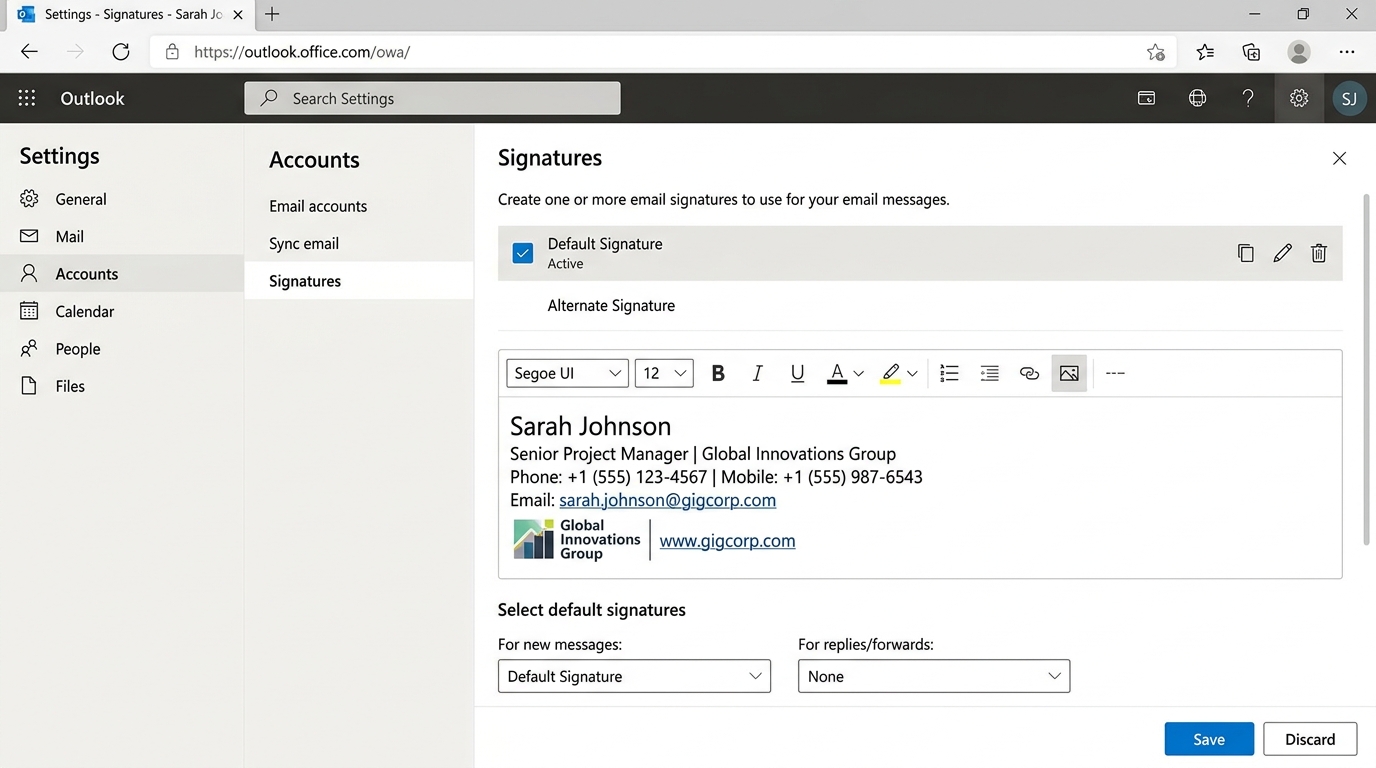
Path: Settings (Gear) > Accounts > Signatures (or Mail > Compose and reply)
How to Add, Change, or Update Your Signature:
- Copy rich signature: Design your signature and click One-Click Copy.
- Open Web Settings: Navigate to
outlook.office.comand log into your work or personal account. Click the Gear icon (Settings) in the top-right corner. - Go to Signatures: In the search box type “Signature”, or navigate to Accounts > Signatures (in older versions, Mail > Compose and reply).
- Add or Edit: Click + New signature, enter a signature name, and paste (
Ctrl + V/Cmd + V) directly into the web editor box. - Assign and Save: Under Select default signatures, choose your newly created signature for For new messages (and optionally for replies/forwards, or leave blank to keep threads clean), then click Save.
Setting your signature in Outlook Web activates Microsoft Exchange Cloud Roaming, syncing the signature across supported web sessions and mobile apps automatically.
Outlook for Mac (macOS Sonoma & Tahoe)
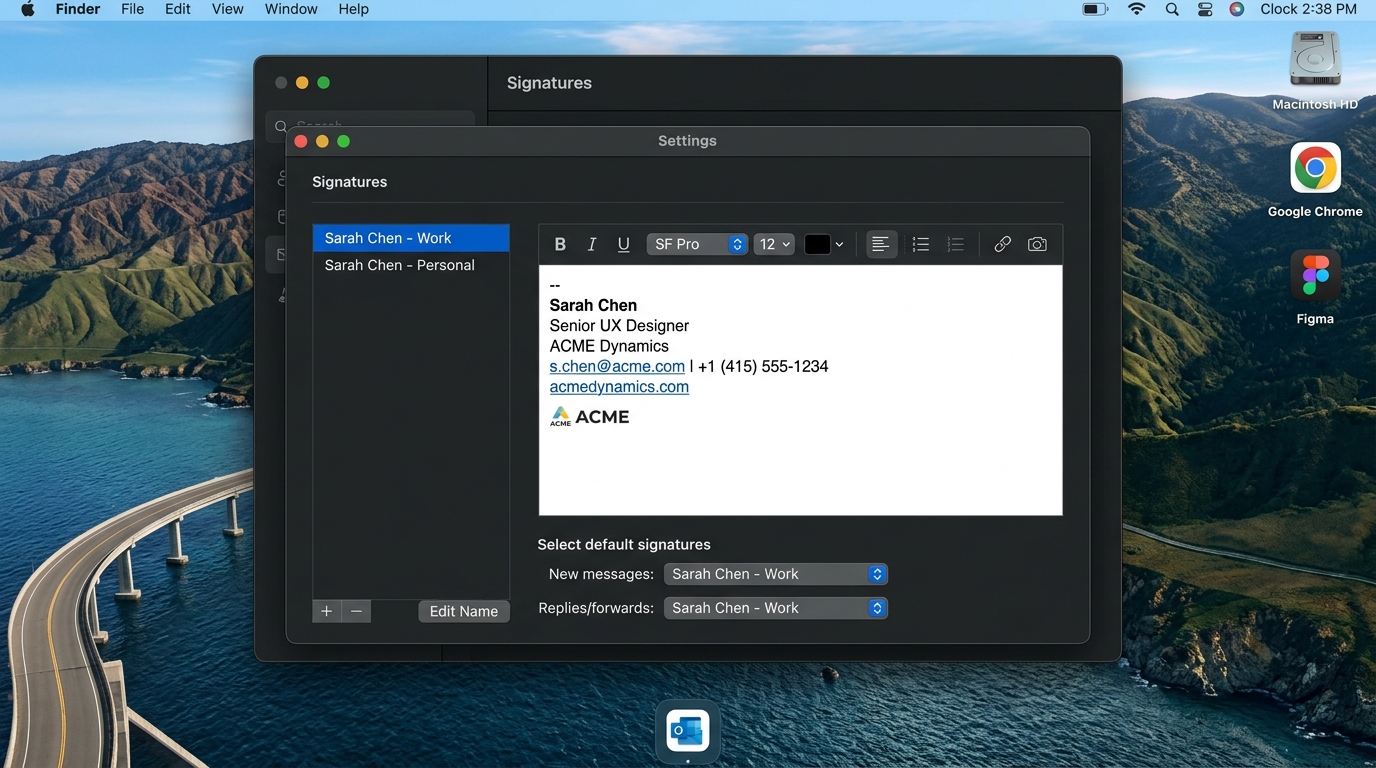
Path: Outlook Menu > Settings (or Cmd + ,) > Signatures
How to Add, Change, or Update Your Signature:
- Copy rich signature: Click One-Click Copy in the editor below.
- Open Mac Settings: Open Outlook for Mac, click Outlook in the top Apple menu bar, and click Settings... (or press
Cmd + ,). - Open Signatures: In the Settings dialog, click the Signatures icon.
- Add or Edit: Click the + button at the bottom-left of the signature list, or click Edit Name / double-click an existing item to update it.
- Paste and Close: Paste (
Cmd + V) into the right editing canvas. Under Select default signatures, map your account for new messages (and optionally replies). Close the window to save automatically.
macOS uses WebKit for rendering. While font rendering is crisp, custom web fonts (like Google Fonts) might fallback to Apple system fonts unless standard web-safe fonts (Arial, Helvetica, Georgia) are declared.
Outlook Mobile App (iPhone, iPad & Android)
Path: Profile Avatar > Settings (Gear) > Signature
The mobile Outlook apps for iOS and Android only offer a plain-text signature box in their mobile settings. However, you have two verified methods to display complete rich HTML signatures from your phone:
Method A: Cloud Mailbox Roaming (Recommended)
Set up your signature in Outlook on the Web or New Outlook for Windows. With Microsoft 365 Exchange accounts, your mobile app will automatically append your formatted web signature to sent emails.
Method B: Draft Email Copy-Paste
Send an email containing your copied HTML signature to yourself. Open the email in Outlook Mobile on your phone, copy the formatted signature block, navigate to Settings > Signature, and paste.
Under the Hood: What Classic Outlook Does to Your Layout
Why standard web code fails in Classic Outlook: Microsoft Word 16.0 renders HTML using a 1990s print-layout engine. It completely strips modern CSS, ignores margins, and inherits paragraph line-heights into table cells.
Uses flexbox or modern div wrappers. Omits MSO table resets and relies solely on CSS styles for image dimensions.
<!-- Typical broken web generator output -->
<div style="display: flex; gap: 16px;">
  <!-- Flexbox stripped by Word; wraps to vertical stack -->
  <img src="avatar.jpg" style="width: 80px; height: 80px;" />
  <!-- Missing width="" attribute: image expands to 800px on 125% DPI -->
  <div style="margin-left: 12px;">
    <!-- Margin ignored by Word; text collides with image -->
    <span style="font-family: 'Inter', sans-serif;">Jane Doe</span>
    <!-- External web font stripped; reverts to Times New Roman -->
  </div>
</div>Adds the Outlook-only conditional tags, table resets, and explicit image width and height attributes that the Word engine needs to keep the layout intact.
<!-- EmailSignatureKit AST-Compiled Output -->
<!--[if mso]>
<table role="presentation" border="0" cellpadding="0" cellspacing="0" width="100%"
       style="border-collapse:collapse; mso-table-lspace:0pt; mso-table-rspace:0pt;">
<tr>
  <td width="80" valign="top" style="width:80px; padding-right:14px; mso-line-height-rule:exactly;">
    <!-- Explicit attributes lock image geometry on 125%/150% DPI screens -->
    <img src="avatar.jpg" width="80" height="80" style="display:block; width:80px; height:80px; border:0;" />
  </td>
  <td valign="top" style="font-family:Arial, Helvetica, sans-serif; mso-line-height-rule:exactly;">
    <p style="margin:0 0 3px 0; font-size:14px; line-height:18px; font-weight:bold; color:#0f172a;">Jane Doe</p>
  </td>
</tr>
</table>
<![endif]-->
The Physics of Windows High-DPI Scaling (96 DPI vs 120 DPI)
On Windows 10 & 11 laptops with 125% or 150% system display scaling, Windows converts 96 logical DPI to 120 physical DPI. When Microsoft Word renders an email, if an <img> tag relies only on CSS style="width: 80px" without explicit HTML width="80" attributes, Word bypasses CSS and reads the raw image header dimensions. A high-resolution 2x photo (e.g. 800px wide) will suddenly display at its full physical 800px width, pushing text completely off-screen. EmailSignatureKit injects matching HTML attributes and CSS constraints simultaneously to ensure pixel stability.
Top 5 Outlook Email Signature Problems & Fixes
Proven engineering solutions to the most frustrating rendering bugs in Microsoft Outlook.
Logos & Headshots Stretch or Enlarge
Why it happens: Outlook Classic ignores CSS max-width on high-resolution Windows screens with 125% or 150% display scaling.
Our compiler sets explicit HTML attributes (width="80" height="80") directly on the <img> tag combined with inline styles.
Random 10px White Gaps Between Table Rows
Why it happens: Word engine treats table cells as paragraphs, inheriting standard paragraph line-height and margin spacing.
We enforce line-height:0; font-size:0; on image containers and compile strict cellpadding="0" cellspacing="0" across all table cells.
Artificial White Borders in Dark Mode
Why it happens: Outlook automatically applies default 1px borders to tables that do not have an explicit zero border attribute.
We write dual overrides: HTML border="0" and inline CSS border:none !important; mso-table-lspace:0pt; mso-table-rspace:0pt;.
Signature Disappears When Replying or Forwarding
Why it happens: Outlook defaults the Replies/forwards signature dropdown setting to “(none)” upon creation.
In the Signatures settings panel, make sure to explicitly assign your signature to the Replies/forwards dropdown, not just New messages.
Custom Web Fonts Collapse to Times New Roman
Why it happens: Outlook cannot download external web fonts (like Montserrat or Inter) and abruptly reverts to Times New Roman.
Our system pairs modern fonts with clean, professional fallback stacks (e.g. Arial, Helvetica, sans-serif) so Outlook never falls back to serif.
Enterprise Microsoft 365 Compatibility Standards
Built to pass corporate spam filters, bandwidth limits, and rendering checks.
Outlook-only formatting instructions
Essential XML conditionals to instruct the Word rendering engine how to draw tables and spacing.
Fixed Width Table Architecture
Avoids 100% fluid tables that stretch uncontrollably on widescreen Outlook monitors.
No Flexbox / Grid Dependencies
Outlook's rendering engine does not support modern CSS display properties.
Exchange Safe Sizing
Signatures compiled under 5KB to prevent corporate mail server rejection or relay delays.
Customize Your Outlook Email Signature in Studio
Fine-tune your name, title, corporate logo, colors, and links in our full-screen workspace. Supports 1-click Dual-MIME export for Outlook Web, 365, and Classic Desktop.
Frequently Asked Questions About Outlook Email Signatures
How do I add or change my email signature in Outlook?
In Outlook Web or New Outlook: Click Settings (gear) > Accounts > Signatures, add your new signature or select an existing one to edit/change, and save. In Classic Desktop Outlook: Go to File > Options > Mail > Signatures to create or update your signature.
Why do images stretch, enlarge, or blur in Outlook Desktop?
Outlook Classic relies on the Microsoft Word rendering engine which ignores CSS max-width if physical HTML width and height attributes are absent. Our compiler explicitly sets exact HTML attributes (`width='XX' height='XX'`) alongside inline styles to keep logos crisp.
Why does my email signature disappear when replying or forwarding in Outlook?
In the Outlook signature settings window, check 'Choose default signature' (or 'Select default signatures'). Outlook defaults 'Replies/forwards' to 'None' until you explicitly select your signature from the dropdown.
How do I fix unexpected white borders or dark mode inverted colors in Outlook?
Outlook Word engine automatically adds default borders around tables without explicit zero-border markup, and dark mode algorithms invert unstyled hex colors. Our generator injects `mso-table-lspace:0pt; mso-table-rspace:0pt; border:0;` and transparent container structures to withstand dark mode inversion.
Can I update an existing signature without re-typing my contact details?
Yes. Simply load this template in our Interactive Studio, adjust your title, phone, or links, click 'One-Click Copy', open Outlook's signature editor, select your existing signature name, and paste over the old content to update it instantly.
Does this Outlook signature work across PC, Mac, and mobile?
Yes. Our nested table architecture has been verified across Microsoft 365, New Outlook for Windows, Classic 2016-2021, Outlook for Mac, Outlook on the Web, and Outlook iOS/Android.